From Public Noticeboard to Civic Website
Public noticeboards made civic information visible; learn how civic websites can keep notices clear, findable and useful beyond the town-hall wall.
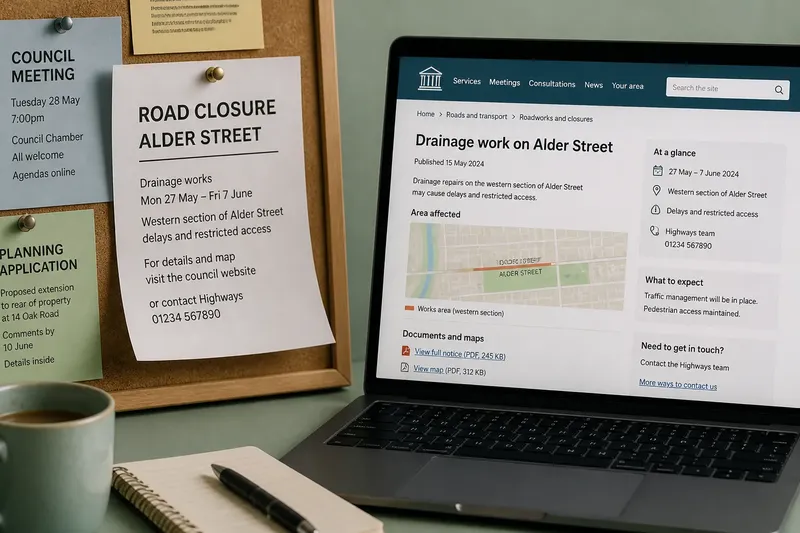
A paper notice curls beside the town hall entrance, announcing a road closure to people waiting for the bus. Search for “public noticeboard to civic website” and the same question appears in a new form: can residents find the information, understand it and see what to do next?
Noticeboard to website
A public noticeboard gave official information a visible place. A council, court or local board might post a meeting notice, planning application, service interruption or proposed rule where residents could inspect it. The physical setting made the public purpose easy to recognise: a notice in a library, council office or community hall was connected to local business.
Yet a wall is a narrow doorway. Someone had to know which board to visit, arrive while the building was open and locate the relevant sheet. Crowded displays, weather and fading paper could make notices difficult to read. People who lived elsewhere, worked awkward hours or needed another format could miss them.
A civic website changes the route, not the underlying task. It can make a document available beyond one building and link it to maps, meeting papers or further information. But a notice hidden behind several menus may be no easier to find than a sheet buried under flyers.
Finding official notices
Begin with the public body responsible for the subject. A local road closure may appear under a council’s transport or highways pages; a public meeting may be listed on the relevant authority’s meetings page. Search using the place, street or service name, then check that the result belongs to the body named in the notice.
Look for a descriptive title, the issuing body, the publication date and the area affected. A summary can help you decide whether to open a linked document, but check the full notice or map if a boundary, deadline or response route matters. Treat a search result or shared social-media post as a pointer, not necessarily the latest version.
Say you live on Alder Street and hear that drainage repairs may affect access. You search the council website for the street name and open a notice headed “Drainage work on Alder Street”. The map marks only the western stretch, while your home is on the eastern stretch; you then contact the named service to ask whether your address is affected, rather than assuming the headline covers the whole road.
If a link is broken or points to an old notice, look for the body’s notices archive or contact the office named on a related page. Keep the notice title and page address handy so staff can identify what you mean.
Clear notice details
A useful notice answers practical questions early: who issued it, what is changing or proposed, which places or services are affected, and what residents can do. The particular publication requirements vary by institution and subject, so the relevant rules and the issuing body’s instructions determine what form of notice is valid.
Good titles name the matter rather than relying on internal labels. Dates should distinguish publication from the date of a change, event or response deadline. Where location matters, use familiar street names, a map or both. A link labelled “Read the planning drawings” tells readers more than “click here”.
A short summary can sit beside formal wording and supporting documents. Think of it as a label on a filing drawer: it helps you reach the right folder, but it does not replace what is inside.
Digital accessibility is part of clarity. A scanned image may be hard for a screen reader to interpret or difficult to enlarge and search. Selectable text, meaningful headings, descriptive links and a route to request another format can make the notice usable by more residents.
Changes and responsibility
Who updates an online notice depends on the institution’s arrangements and any rules that apply to publication. The page should make the issuing body and a useful contact route clear, so readers can ask who handles the notice or request clarification. Where responsibility is shared, naming the relevant department or partner body avoids leaving residents to guess.
If a meeting moves, a service interruption changes or a proposal is withdrawn, the page should explain what changed and when. Depending on the publication system, an archive, update history or status label can help readers distinguish current information from an earlier version. A page that is silently replaced can leave someone relying on a saved copy without knowing it is out of date.
Residents who find a dead link, unclear map or missing document can report it through the contact route provided. That helps flag a problem; it does not settle which body has a formal duty to maintain or publish the notice. The applicable rules and institutional arrangements do.
More than one channel
A website cannot serve every reader by itself. Some residents have limited internet access, prefer a printed notice or need information in another format. A physical board can still reach people passing through a library or service centre, while a phone contact may help someone who cannot use the online document.
For a neighbourhood change, an authority might publish a web notice and display a local copy at a library. If it does, the channels should point to consistent information and make clear where the authoritative version can be checked. Which channels are appropriate depends on the audience and the publication rules.
What should readers check?
Is it from the right body?
Check the issuing body and whether the page is on its official site. If the notice appears only in a copied social-media post, use it to locate the original or contact the named institution before relying on it.
Do the dates still apply?
Separate the publication date from the date of the event, change or response deadline. If the page shows an update or cancellation, follow the newer status; if it does not, ask the responsible office whether the notice remains current.
Where is the supporting detail?
Open the linked map, document or application when the summary leaves out details that affect you. If the file will not open or cannot be read with your access needs, request an explanation or alternative format from the listed contact.
What can you do next?
Look for a response route, named contact or meeting information, and note any deadline shown. If none is provided, contact the issuing body and ask how to make an enquiry or submit a response.
A reader’s quick check
Use these checks to decide what to do when a public notice is unclear. Each result points to a practical next action rather than an assumption about the institution’s obligations.
- Check whether the page names an issuing body; if it does, use that body’s contact route for questions, but if it does not, search the official site or ask the office named on a related document.
- Check whether the notice gives a publication date; if it does, compare it with the event or response dates, but if it does not, ask the issuing office for the current version.
- Check whether the notice includes a map or clear location; if the affected area is identifiable, compare it with your street, but if the boundary remains unclear, ask the named service about your address.
- Check whether a response deadline is stated; if it is, follow the specified route before that date, but if no deadline or route appears, contact the body to ask what options remain.
- Check whether the linked document opens and can be read; if it can, review the details relevant to you, but if it cannot, request an accessible copy or plain-language explanation.
- Check whether the page records a change, cancellation or withdrawal; if it does, rely on the latest stated status, but if the status is absent or ambiguous, confirm it with the issuing body.
Keeping the public record
Imagine a resident sees a notice about a proposed change to a bus stop, but the linked map will not load. They note the notice title and street, call the contact listed on the page and ask for an accessible map and the response route. If the office supplies both, the resident can compare the location with their journey and decide whether to send a comment; if the office cannot confirm the notice’s status, the resident knows to wait for clarification rather than act on an uncertain version.
A useful civic website gives notices a clear home, readable wording, working links and a visible route to questions or action. The move from public noticeboard to civic website is not complete merely because paper has disappeared. For anyone searching “public noticeboard to civic website”, the practical test is whether a resident can find the current information, identify who issued it and learn what to do when a detail is missing.